Get started
Create your Kubernetes cluster today
no credit card required / no setup fee / first 30 days free
Managed Kubernetes
Teletek operates your Kubernetes cluster,
you focus on your applications
Teletek Kubernetes is a managed Kubernetes platform operated in our own data centers. The control plane, servers, network and storage layer are Teletek's responsibility — you simply deploy and scale your applications.
01 — Overview
What the service covers
Use the flexibility of Kubernetes without the burden of operating the infrastructure.
A managed control plane
The Kubernetes control plane is built, monitored, patched and upgraded by Teletek. You never need access to control-plane servers; you manage your cluster through the control panel and standard Kubernetes interfaces.
Standard Kubernetes, no provider lock-in
The cluster exposes a standard Kubernetes API. Your organisation's existing tooling and application definitions work without modification, and moving elsewhere later remains an option.
Single-point lifecycle
Ordering, plan changes, capacity increases and termination run through the Teletek Customer Portal. Your cluster follows the state of your order, and no setup fee is charged.
In our own data centers
Server, network, security and storage resources are operated end to end by Teletek. You always know which country hosts your data and can plan business continuity accordingly.
02 — Capabilities
What is up and running when your cluster is delivered
Capabilities that require no additional configuration and are usable from day one.
Automated provisioning and delivery
Once your order is confirmed, the cluster, control-panel access and credentials are prepared automatically. No manual installation steps and no separate setup project are required.
Continuous availability and automatic recovery
Application instances that stop are restarted automatically, and workloads on a failed server are transferred to healthy servers. Rolling updates are applied without service interruption.
Scaling at two levels
Replica counts scale at application level and capacity scales at node level. You define the scaling range; as load rises capacity is added automatically within it, while scale-down and node draining follow your own configuration.
Internet-facing services
Load balancing and the internet-facing service address are provided by the infrastructure; when you publish an application, an external address is assigned automatically. Network configuration is not your concern.
Persistent storage
Persistent storage is provided for data-driven applications and runs on an all-flash NVMe disk pool. Your quota is defined by your plan and tracked in the panel.
Access control and observability
Role-based access control, secret management and namespace-level network policies behave exactly as in standard Kubernetes. Resource metrics and application logs are available in the panel and through standard tooling.
03 — How it works
Four steps from plan selection to scaling
Plan selection
You order the plan that fits your requirements through the Customer Portal. CPU, memory and NVMe storage quotas are defined by your plan, and no setup fee is charged.
Cluster creation
Provisioning starts automatically once payment is confirmed: tenant space, network and address allocation, the control panel and then the Kubernetes cluster. When the panel is ready, your access details arrive by email.
Access and application deployment
Download your cluster access file (kubeconfig) from the panel, connect to the cluster and deploy your applications. You can expose a service to the internet and serve it on your own domain.
Monitoring and scaling
Track resource usage and quotas in the panel. As demand grows you widen the scaling range or upgrade your plan from the portal.
04 — Architecture
The path traffic follows and who owns each layer
The thing most often misunderstood about a managed service is where the line runs; the diagram below makes it explicit.
Teletek manages
- Physical infrastructure, virtualization and storage hardware
- The Kubernetes control plane and version upgrades
- Backbone, network, load balancing and service addresses
- Worker server operating systems and patching
- 24/7 monitoring and incident response
You manage
- Your applications, namespaces and container images
- Your application data and backup workflow
- Team access permissions and network policies
- Decisions on resource size and scaling range
- Any additional components you need
If the problem is in your own resources — an application, a namespace, a configuration — it is on your side. If it is in the servers, in cluster access or in address allocation, it is on Teletek's side, and opening a support ticket is all that is needed.
05 — Control panel
What you can do in the panel
Cluster status
Kubernetes version, node count and the health of your cluster.
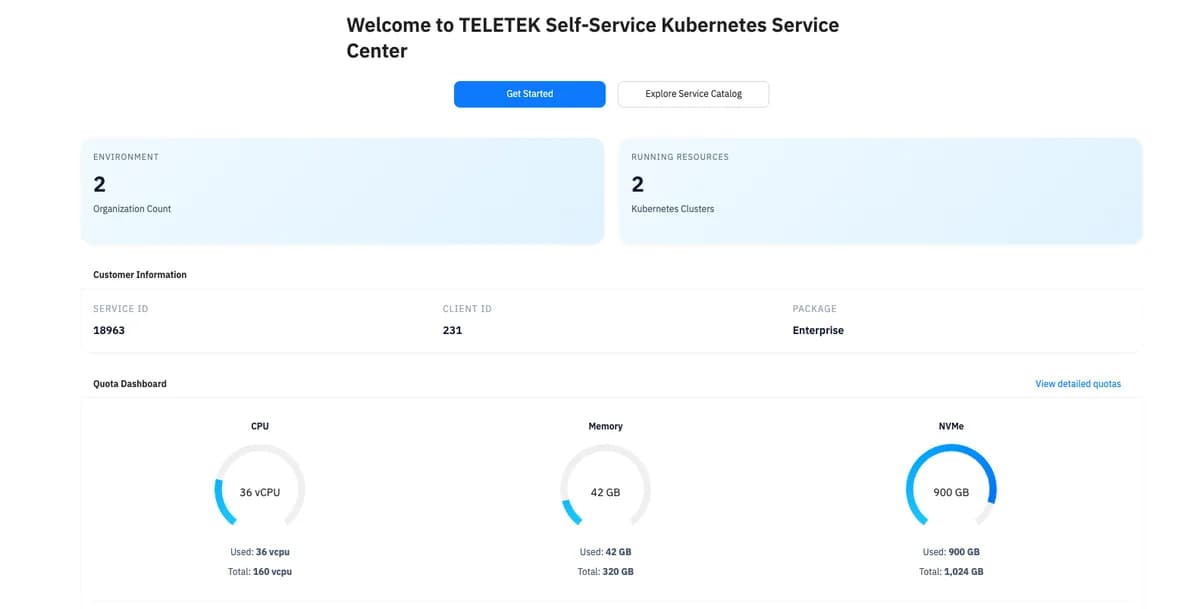
Quota dashboard
The CPU, memory and NVMe quota defined by your plan, with used and remaining amounts.
Workloads
Namespaces, running applications and services, plus their resource consumption.
Access details
Download your cluster access file (kubeconfig) and view the API address.
Metrics
CPU and memory charts at node and application level.
Service catalog
Single point of access to your Kubernetes service and other Teletek cloud services.
06 — Specifications
Technical profile of your cluster
The current technical framework of the product, for teams running a technical evaluation.
| Component | Status | Detail |
|---|---|---|
| Kubernetes version | READY | Your cluster is provisioned with a currently supported version; version upgrades are carried out by Teletek within a planned maintenance window. |
| Control plane | MANAGED | Operated, monitored and patched by Teletek. A high-availability option is offered on selected plans. |
| Worker servers | READY | Ubuntu 22.04 LTS with the containerd container runtime. |
| Pod network | INSTALLED | The cluster network ships configured; no extra setup is required. |
| Load balancing | READY | Publishing a service assigns an internet-facing address automatically. |
| Persistent storage | READY | All-flash NVMe disk pool; the quota is defined by your plan. |
| Autoscaling | READY | Replicas at application level, capacity at node level. You define the range. |
| Access control | READY | Role-based access control, secret management and network policies — standard Kubernetes behaviour. |
| Metrics and logs | INSTALLED | Resource metrics and application logs are reachable from the panel and via standard tooling. |
| Management interfaces | READY | A web control panel plus the standard Kubernetes API; your existing toolchain works. |
| Data centers | 4 SITES | Istanbul Europe, Istanbul Anatolia, Ankara and Düsseldorf. |
| Billing | PORTAL | Ordering, plan changes, suspension and termination through the Customer Portal. |
07 — Plans
Three service plans
Choose the plan that fits your needs from packages built on Intel® Xeon® Platinum processors, DDR5 memory and high-performance IBM FlashCore® Module NVMe storage.
Current resource and pricing details are available through the Customer Portal.
Development and test
An entry plan for a single application, low traffic and evaluation environments.
Production workloads
For multiple services, moderate traffic and production applications that require continuity.
Heavy production
For a wide scaling range, high resource demand and enterprise continuity requirements.
08 — Lifecycle
Service lifecycle
Commercial steps — ordering, plan changes, billing and support tickets — run through the Teletek Customer Portal, while technical monitoring and day-to-day operation of your cluster happen in the Control Panel.
Order
You order your plan from the portal. Provisioning starts automatically once payment is confirmed, and no setup fee is charged.
Active use
While your Kubernetes cluster runs, monitoring, maintenance, patching and version upgrades are handled by Teletek; you follow its status and resource usage in the Control Panel.
Capacity increase
As your needs grow you upgrade your plan or resource quota from the portal; the change is applied to your cluster and your invoice is adjusted accordingly.
Suspension or termination
If payment cannot be collected, the service is suspended per policy. On termination the cluster, servers, volumes and addresses are reclaimed and billing ends.
Termination is irreversible and data inside the cluster cannot be recovered. Export your application data and definitions to your own environment before closing the service.
09 — Infrastructure
The infrastructure your cluster runs on
Your Kubernetes cluster runs in Teletek's own data centers on a fully redundant architecture. Server, network, security and storage resources are managed end to end by Teletek. Enterprise security and continuity services that are not part of the Kubernetes plan — intrusion detection and prevention, DDoS protection, web application firewall, multi-factor authentication and backup to targets outside the cluster — are planned together according to your requirements.
10 — Frequently asked questions
Frequently asked questions
Do we need to know how to operate Kubernetes?
You don't need to know how to run a cluster — installation, patching, server health, network and the storage layer are Teletek's responsibility. Standard Kubernetes knowledge is enough to deploy your applications, and you start with a step-by-step Welcome Package plus 24/7 engineer support.
Will our existing toolchain and application definitions work?
The cluster exposes a standard Kubernetes API, so your command-line tools, package managers, CI/CD pipeline and GitOps workflows need no changes. Simply keep your client version close to your cluster's version; the current version of your cluster is visible in the Control Panel.
How long until the cluster is ready?
Provisioning starts automatically once payment is confirmed; there is no manual step. When your control panel is ready your access details arrive by email and your order becomes active. You see the cluster come up in the panel. Cluster setup usually completes within 20 minutes.
How does sign-in work?
The Control Panel button in the top right takes you into the corporate single sign-on (SSO) flow. Once authentication completes you reach the Cloud Control Panel within the scope of your own organisation.
Is autoscaling really automatic?
You define the scaling range; as load rises, capacity is added automatically within that range. Scale-down and node draining never happen on their own unless you configure them, so running workloads are never moved without your knowledge.
Can we publish an application on our own domain over HTTPS?
Yes. When a service is published, an internet-facing address is assigned; point your DNS record at it and serve the application on your own domain. For host-based routing and certificate termination you can use the standard Kubernetes components you prefer.
Can we change the plan or terminate the service?
Both run through the Customer Portal. A plan change is applied to your cluster and your invoice is adjusted accordingly. Termination is irreversible: the cluster, servers, volumes and addresses are reclaimed, so export your data and application definitions to your own environment beforehand.
How is support provided?
Technical support, billing and plan requests run through support tickets opened in the Customer Portal. Including your service number, cluster name and the time the issue was first observed shortens resolution time.